
Mikrotik produces powerful equipment for advanced users with affordable prices. It’s similar to Linux in a way - you can modify almost anything, but don’t expect it’s going to work good out of a box.
When I’ve bought MikroTik hAP ax³ I was disappointed with low performance and lack of band steering (devices were stuck on 2.4 Ghz if got connected to it).
After quite some sleepless evenings I got it working in a good way, so clients have decent speed, connect to 802.11ax and use widest band width available.
Main drawback of Mikrotik wireless as it does not support band steering - option to steer devices between 2 and 5Ghz bands. We will try however - to optimize the settings as good as possible.
5Ghz settings
Regulatory domains across all countries and continents are using different power transmitting limitations and router manufacturers are forced to comply. Some years ago You could skip settings Country in Mikrotik WiFi interface settings and use full power. That’s not possible. You could set theoretically Country to United States, but modern WiFi chips would ignore that network at all.
So, here we go step by step:
1. Set right country
Set Country in Your WiFi interface settings to Your real country. Both of course - 2Ghz and 5Ghz.
2. Check regulatory domain max transmitting power
In Mikrotik device You can check what are maximum transmitting power options for each bad for particular country.
Open terminal and enter command
interface/wifi/radio/reg-info country="your country"
After You are prompted number - press 1
For Latvia it would look like this:
interface/wifi/radio/reg-info country=Latvia
number: 1
  ranges: 2402-2482/20dBm/40MHz
          5170-5250/23dBm/160MHz/indoor
          5250-5330/23dBm/160MHz/indoor/dfs
          5490-5730/30dBm/160MHz/dfs
          5735-5875/14dBm/80MHz
2402-2482/20dBm/40MHz - this is 2.4Ghz, nothing strange here
All the other ranges belong to 5Ghz, which is most important for us.
Observe that dBm everywhere is different. Bands 5735-5875 for instance have only 14dBm which we don’t want to use probably.
3. Set 5Ghz frequency according to region limitations
So, we could go to WiFi settings and set Frequency to 5170-5330 in order to avoid low-power frequencies:
interface/wifi/set channel.frequency=5170-5730 "5Ghz-interface-name"
4. Mind Your channel choice!
There can be a lot of negative posts seen on the internet about poor performance of WiFi and lower than advertised speeds. That can be true, if channel not chosen carefully. The catch is - not all channels support 80mhz speed, thus limiting max speed to 40mhz like channels 132-144 (5650-5725 mhz) which leaves us with 50% speed only. Mikrotik itself can broadcast 80mhz channel, but clients won’t simply use it and it is not Mikrotik device fault.
So, these are the channels that would allow 80mhz speeds:
- 36-48 (5150-5250 mhz) non DFS
- 52-64 (5250-5350 mhz)
- 100-112 (5470-5600 mhz)
- 116-128 (5600-5650 mhz) 10 min DFS scan needed
2Ghz settings
1. Use only 20Mhz channel
We should use only 20Mhz channel for 2Ghz network (unless there are no neighboring WiFi networks) due to low amount of channels and high congestion. In any case - 2Ghz should be used only as fallback, if 5Ghz goes down due to DFS radar interference, for instance or device gets far away from access point.
2. Use only non-overlapping channels
In 2Ghz networks there are only 3 non-overlapping channels. Typically there are many more APs in dens areas. We could reduce chance of interference by specifying only those non-overlapping channels. it’s done in similar way to 5Ghz setting:
interface/wifi/set channel.frequency=2437,2412,2462 "2Ghz-interface-name"
3. Antenna gain setting is no longer essential
Antenna gain setting is being set in Mikrotik to a default value. In Sweden value is 6. So the only way is to increase the value thus lower the transmitting power (higher antenna gain lead to weaker signal) which we don’t want to do most likely. So - parameter to be skipped at all.
Kinda band steering
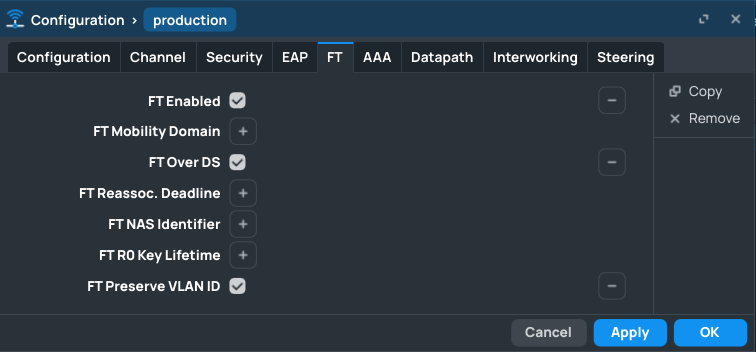
1. Enable FT
This is needed ability for devices to transition seamlessly between 2ghz and 5ghz networks. Option FT Preserve VLAN ID in not necessarily needed, unless VLANs are actually in use for wireless network.
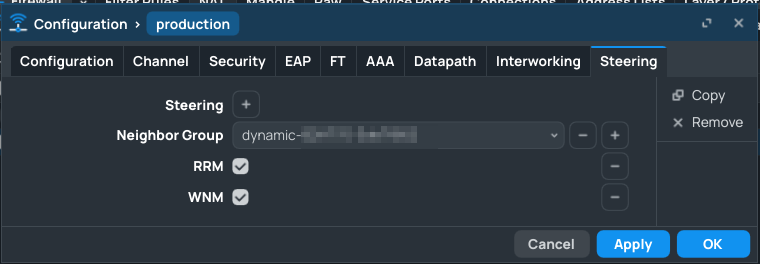
2. Enable Steering neighbor group
Let the system know - what are the “neighbor” APs between which system can switch. RRM and WNM are needed for fast roaming.
3. Controversial advice
This is no longer needed since RouterOS 7.19.2 released on June 2025
Since 7.15 - Mikrotik started using newer Qualcomm drivers that have become less stable. In my case - devices once got connected to 2.4 Ghz - never wanted to go back to 5 Ghz.
One of the options is to set Connection Priority under WiFi -> Security tab to 0/1. Doing that - would lead in turn to NVD - CVE-2022-47522
which allows to bypass client isolation.
Credits to this site: Has MikroTik repaired broken Wifi on hAP ax3 yet?